Top Angebote und noch mehr!

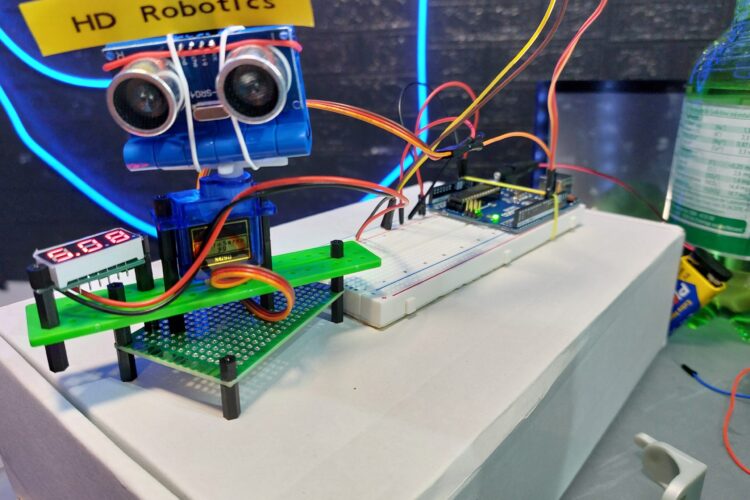
Projekt Beschreibung
Willkommen zu meinem neuesten Arduino-Projekt! In diesem Video zeige ich euch, wie ihr ein Radar-System mit einem Arduino und einem Ultraschallsensor erstellt und die Daten in Processing visualisiert. Wir haben das Fenster auf eine größere Größe (1600×900) angepasst, um eine bessere Übersicht zu erhalten.
Was ihr lernen werdet:
- Wie man einen Ultraschallsensor mit einem Arduino verbindet.
- Wie man einen Servo-Motor verwendet, um den Sensor zu schwenken.
- Wie man serielle Daten von Arduino an Processing sendet.
- Wie man eine Echtzeit-Radarvisualisierung in Processing erstellt und anpasst.
Materialien:
- Arduino Uno
- HC-SR04 Ultraschallsensor
- SG90 Servo-Motor
- Jumper-Kabel
- Breadboard
- USB-Kabel
Arduino Code:
Wir verwenden einen Arduino-Code, um den Ultraschallsensor zu steuern und die Entfernungsmessungen an Processing zu senden.
// Includes the Servo library
#include

// Defines Trig and Echo pins of the Ultrasonic Sensor
const int trigPin = 10;
const int echoPin = 11;

// Variables for the duration and the distance
long duration;
int distance;

Servo myServo; // Creates a servo object for controlling the servo motor

void setup() {
  pinMode(trigPin, OUTPUT); // Sets the trigPin as an Output
  pinMode(echoPin, INPUT);  // Sets the echoPin as an Input
  Serial.begin(9600);
  myServo.attach(12); // Defines on which pin is the servo motor attached
}

void loop() {
  // Rotates the servo motor from 15 to 165 degrees
  for (int i = 15; i <= 165; i++) {
    myServo.write(i);
    delay(30);
    distance = calculateDistance(); // Calls a function for calculating the distance measured by the Ultrasonic sensor for each degree

    Serial.print(i);         // Sends the current degree into the Serial Port
    Serial.print(",");       // Sends addition character right next to the previous value needed later in the Processing IDE for indexing
    Serial.print(distance);  // Sends the distance value into the Serial Port
    Serial.print(".");       // Sends addition character right next to the previous value needed later in the Processing IDE for indexing
  }

  // Repeats the previous lines from 165 to 15 degrees
  for (int i = 165; i > 15; i--) {
    myServo.write(i);
    delay(30);
    distance = calculateDistance();
    Serial.print(i);
    Serial.print(",");
    Serial.print(distance);
    Serial.print(".");
  }
}

// Function for calculating the distance measured by the Ultrasonic sensor
int calculateDistance() {
  digitalWrite(trigPin, LOW);
  delayMicroseconds(2);
  // Sets the trigPin on HIGH state for 10 micro seconds
  digitalWrite(trigPin, HIGH);
  delayMicroseconds(10);
  digitalWrite(trigPin, LOW);

  duration = pulseIn(echoPin, HIGH); // Reads the echoPin, returns the sound wave travel time in microseconds
  distance = duration * 0.034 / 2;
  return distance;
}
Processing Code:
Der Processing-Code visualisiert die Daten in einem größeren Fenster (1600×900) und zeigt den Winkel und die Entfernung des erkannten Objekts in Echtzeit an.
import processing.serial.*; // Imports library for serial communication
import java.awt.event.KeyEvent; // Imports library for reading the data from the serial port
import java.io.IOException;
Serial myPort; // Defines Object Serial

// Defines variables
String angle = "";
String distance = "";
String data = "";
String noObject;
float pixsDistance;
int iAngle, iDistance;
int index1 = 0;
int index2 = 0;
PFont orcFont;

void setup() {
  size(1200, 700); // ***CHANGE THIS TO YOUR SCREEN RESOLUTION***
  smooth();
  myPort = new Serial(this, "COM5", 9600); // Starts the serial communication
  myPort.bufferUntil('.'); // Reads the data from the serial port up to the character '.'. So actually it reads this: angle,distance.
}

void draw() {
  fill(98, 245, 31);
  // Simulating motion blur and slow fade of the moving line
  noStroke();
  fill(0, 4);
  rect(0, 0, width, height - height * 0.065);

  fill(98, 245, 31); // Green color
  // Calls the functions for drawing the radar
  drawRadar();
  drawLine();
  drawObject();
  drawText();
}

void serialEvent(Serial myPort) { // Starts reading data from the Serial Port
  // Reads the data from the Serial Port up to the character '.' and puts it into the String variable "data".
  data = myPort.readStringUntil('.');
  data = data.substring(0, data.length() - 1);

  index1 = data.indexOf(","); // Finds the character ',' and puts it into the variable "index1"
  angle = data.substring(0, index1); // Reads the data from position "0" to position of the variable index1 or thats the value of the angle the Arduino Board sent into the Serial Port
  distance = data.substring(index1 + 1, data.length()); // Reads the data from position "index1" to the end of the data, which is the value of the distance

  // Converts the String variables into Integer
  iAngle = int(angle);
  iDistance = int(distance);
}

void drawRadar() {
  pushMatrix();
  translate(width / 2, height - height * 0.074); // Moves the starting coordinates to new location
  noFill();
  strokeWeight(2);
  stroke(98, 245, 31);
  // Draws the arc lines
  arc(0, 0, (width - width * 0.0625), (width - width * 0.0625), PI, TWO_PI);
  arc(0, 0, (width - width * 0.27), (width - width * 0.27), PI, TWO_PI);
  arc(0, 0, (width - width * 0.479), (width - width * 0.479), PI, TWO_PI);
  arc(0, 0, (width - width * 0.687), (width - width * 0.687), PI, TWO_PI);
  // Draws the angle lines
  line(-width / 2, 0, width / 2, 0);
  line(0, 0, (-width / 2) * cos(radians(30)), (-width / 2) * sin(radians(30)));
  line(0, 0, (-width / 2) * cos(radians(60)), (-width / 2) * sin(radians(60)));
  line(0, 0, (-width / 2) * cos(radians(90)), (-width / 2) * sin(radians(90)));
  line(0, 0, (-width / 2) * cos(radians(120)), (-width / 2) * sin(radians(120)));
  line(0, 0, (-width / 2) * cos(radians(150)), (-width / 2) * sin(radians(150)));
  line((-width / 2) * cos(radians(30)), 0, width / 2, 0);
  popMatrix();
}

void drawObject() {
  pushMatrix();
  translate(width / 2, height - height * 0.074); // Moves the starting coordinates to new location
  strokeWeight(9);
  stroke(255, 10, 10); // Red color
  pixsDistance = iDistance * ((height - height * 0.1666) * 0.025); // Converts the distance from the sensor from cm to pixels
  // Limiting the range to 40 cms
  if (iDistance < 40) {
    // Draws the object according to the angle and the distance
    line(pixsDistance * cos(radians(iAngle)), -pixsDistance * sin(radians(iAngle)), (width - width * 0.505) * cos(radians(iAngle)), -(width - width * 0.505) * sin(radians(iAngle)));
  }
  popMatrix();
}

void drawLine() {
  pushMatrix();
  strokeWeight(9);
  stroke(30, 250, 60);
  translate(width / 2, height - height * 0.074); // Moves the starting coordinates to new location
  line(0, 0, (height - height * 0.12) * cos(radians(iAngle)), -(height - height * 0.12) * sin(radians(iAngle))); // Draws the line according to the angle
  popMatrix();
}

void drawText() { // Draws the texts on the screen
  pushMatrix();
  if (iDistance > 40) {
    noObject = "Out of Range";
  } else {
    noObject = "In Range";
  }
  fill(0, 0, 0);
  noStroke();
  rect(0, height - height * 0.0648, width, height);
  fill(98, 245, 31);
  textSize(25);

  text("10cm", width - width * 0.3854, height - height * 0.0833);
  text("20cm", width - width * 0.281, height - height * 0.0833);
  text("30cm", width - width * 0.177, height - height * 0.0833);
  text("40cm", width - width * 0.0729, height - height * 0.0833);
  textSize(40);
  text("HD Robotics", width - width * 0.875, height - height * 0.0277);
  text("Angle: " + iAngle + " °", width - width * 0.48, height - height * 0.0277);
  text("Distance: ", width - width * 0.26, height - height * 0.0277);
  if (iDistance < 40) {
    text("        " + iDistance + " cm", width - width * 0.225, height - height * 0.0277);
  }
  textSize(25);
  fill(98, 245, 60);
  translate((width - width * 0.4994) + width / 2 * cos(radians(30)), (height - height * 0.0907) - width / 2 * sin(radians(30)));
  rotate(-radians(-60));
  text("30°", 0, 0);
  resetMatrix();
  translate((width - width * 0.503) + width / 2 * cos(radians(60)), (height - height * 0.0888) - width / 2 * sin(radians(60)));
  rotate(-radians(-30));
  text("60°", 0, 0);
  resetMatrix();
  translate((width - width * 0.507) + width / 2 * cos(radians(90)), (height - height * 0.0833) - width / 2 * sin(radians(90)));
  rotate(radians(0));
  text("90°", 0, 0);
  resetMatrix();
  translate(width - width * 0.513 + width / 2 * cos(radians(120)), (height - height * 0.07129) - width / 2 * sin(radians(120)));
  rotate(radians(-30));
  text("120°", 0, 0);
  resetMatrix();
  translate((width - width * 0.5104) + width / 2 * cos(radians(150)), (height - height * 0.0574) - width / 2 * sin(radians(150)));
  rotate(radians(-60));
  text("150°", 0, 0);
  popMatrix();
}


