Top Angebote und noch mehr!

Projekt Beschreibung
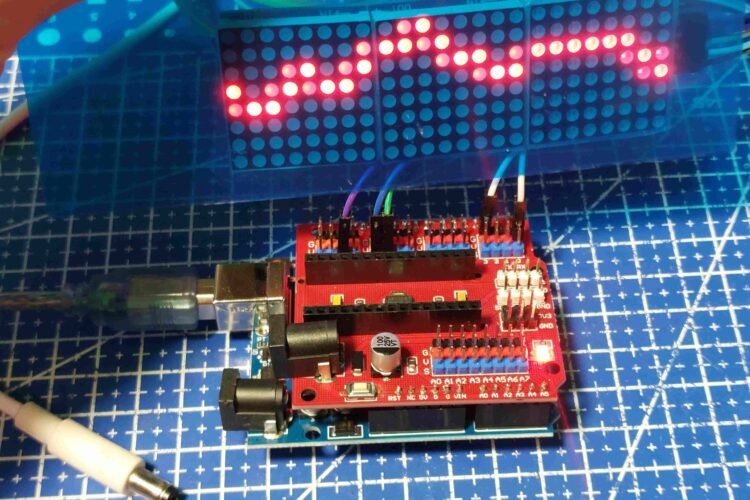
Willkommen auf meiner Website für Arduino- und Elektronikprojekte! Hier zeige ich dir spannende Arduino-Projekte – inklusive aller Details zu Teilen, Verbindungen und Code-Erklärungen. Im aktuellen Projekt arbeiten wir mit dem MD_MAX72XX-Modul und drei LED-Panels, die eine coole Laufschrift anzeigen.
Verwendete Teile:
- Arduino Uno oder ein ähnlicher Mikrocontroller
- Drei 8×8-LED-Matrix-Module mit MAX7219-Chip (einfach kaskadierbar)
- Potentiometer, um die Laufschrift-Geschwindigkeit zu steuern
- Verbindungskabel für die Verdrahtung
- Lötkolben und Lötzubehör, um die Panels sicher zu verbinden
Aufbau und Verbindungen:
- Verkettung der Panels: Schließe das Data-Out-Pin (DO) des ersten Panels an das Data-In-Pin (DIN) des nächsten Panels an. Wiederhole dies bis zum letzten Panel.
- Stromversorgung: Verbinde die 5V- und GND-Pins aller Panels miteinander, damit alle Module ausreichend Strom erhalten.
- Arduino-Verbindungen: Verbinde das DIN des ersten Panels mit dem MOSI-Pin (Pin 11), den CLK-Pin mit SCK (Pin 13), und den CS-Pin mit SS (Pin 10) auf dem Arduino.
- Potentiometer: Zur Geschwindigkeitssteuerung wird das Potentiometer an einen analogen Eingang des Arduino angeschlossen (A5 in unserem Fall), wodurch der Scrollspeed geregelt werden kann.
Code-Erklärung:
Im Code wird die Bibliothek MD_MAX72XX verwendet, um Texte auf die Panels zu bringen und zu scrollen. Die Laufschrift-Nachricht kann über den Serial Monitor eingegeben und sofort angezeigt werden. Der Code speichert die Eingaben und kontrolliert den Textfluss. Mit der Funktion scrollText und dem Callback scrollDataSource können wir die Laufrichtung und Geschwindigkeit anpassen. Ein analoger Wert vom Potentiometer wird über analogRead ausgelesen und in scrollDelay umgerechnet, um die Laufschrift flüssig und nach Belieben schnell oder langsam anzuzeigen.
Entdecke hier auf der Website detaillierte Anleitungen, kreative Elektronik-Ideen und hilfreiche Code-Erklärungen, die dir den Einstieg in Arduino erleichtern!
Bilboard Code :
// Use the MD_MAX72XX library to scroll text on the display
//
// Demonstrates the use of the callback function to control what
// is scrolled on the display text.
//
// User can enter text on the serial monitor and this will display as a
// scrolling message on the display.
// Speed for the display is controlled by a pot on SPEED_IN analog in.
//
#include
#include

#define IMMEDIATE_NEW   0     // if 1 will immediately display a new message
#define USE_POT_CONTROL 1
#define PRINT_CALLBACK  0

#define PRINT(s, v) { Serial.print(F(s)); Serial.print(v); }

// Define the number of devices we have in the chain and the hardware interface
// NOTE: These pin numbers will probably not work with your hardware and may
// need to be adapted
#define HARDWARE_TYPE MD_MAX72XX::PAROLA_HW
#define MAX_DEVICES 11

#define CLK_PIN   13  // or SCK
#define DATA_PIN  11  // or MOSI
#define CS_PIN    10  // or SS

// SPI hardware interface
MD_MAX72XX mx = MD_MAX72XX(HARDWARE_TYPE, CS_PIN, MAX_DEVICES);
// Arbitrary pins
//MD_MAX72XX mx = MD_MAX72XX(HARDWARE_TYPE, DATA_PIN, CLK_PIN, CS_PIN, MAX_DEVICES);

// Scrolling parameters
#if USE_POT_CONTROL
#define SPEED_IN  A5
#else
#define SCROLL_DELAY  100  // in milliseconds
#endif // USE_POT_CONTROL

#define CHAR_SPACING  1 // pixels between characters

// Global message buffers shared by Serial and Scrolling functions
#define BUF_SIZE  75
uint8_t curMessage[BUF_SIZE] = { "Willkommen bei HD Robotics! Like Kommentare abonnieren  " };
uint8_t newMessage[BUF_SIZE];
bool newMessageAvailable = false;

uint16_t  scrollDelay;  // in milliseconds

void readSerial(void)
{
  static uint8_t  putIndex = 0;

  while (Serial.available())
  {
    newMessage[putIndex] = (char)Serial.read();
    if ((newMessage[putIndex] == '\n') || (putIndex >= BUF_SIZE-3)) // end of message character or full buffer
    {
      // put in a message separator and end the string
      newMessage[putIndex++] = ' ';
      newMessage[putIndex] = '\0';
      // restart the index for next filling spree and flag we have a message waiting
      putIndex = 0;
      newMessageAvailable = true;
    }
    else if (newMessage[putIndex] != '\r')
      // Just save the next char in next location
      putIndex++;
  }
}

void scrollDataSink(uint8_t dev, MD_MAX72XX::transformType_t t, uint8_t col)
// Callback function for data that is being scrolled off the display
{
#if PRINT_CALLBACK
  Serial.print("\n cb ");
  Serial.print(dev);
  Serial.print(' ');
  Serial.print(t);
  Serial.print(' ');
  Serial.println(col);
#endif
}

uint8_t scrollDataSource(uint8_t dev, MD_MAX72XX::transformType_t t)
// Callback function for data that is required for scrolling into the display
{
  static uint8_t* p = curMessage;
  static enum { NEW_MESSAGE, LOAD_CHAR, SHOW_CHAR, BETWEEN_CHAR } state = LOAD_CHAR;
  static uint8_t  curLen, showLen;
  static uint8_t  cBuf[15];
  uint8_t colData = 0;    // blank column is the default

#if IMMEDIATE_NEW
  if (newMessageAvailable)  // there is a new message waiting
  {
    state = NEW_MESSAGE;
    mx.clear(); // clear the display
  }
#endif

  // finite state machine to control what we do on the callback
  switch(state)
  {
    case NEW_MESSAGE:   // Load the new message
      memcpy(curMessage, newMessage, BUF_SIZE);    // copy it in
      newMessageAvailable = false;    // used it!
      p = curMessage;
      state = LOAD_CHAR;
      break;

    case LOAD_CHAR: // Load the next character from the font table
      showLen = mx.getChar(*p++, sizeof(cBuf)/sizeof(cBuf[0]), cBuf);
      curLen = 0;
      state = SHOW_CHAR;

      // if we reached end of message, opportunity to load the next
      if (*p == '\0')
      {
        p = curMessage;     // reset the pointer to start of message
#if !IMMEDIATE_NEW
        if (newMessageAvailable)  // there is a new message waiting
        {
          state = NEW_MESSAGE;    // we will load it here
          break;
        }
#endif
      }
      // !! deliberately fall through to next state to start displaying

    case SHOW_CHAR: // display the next part of the character
      colData = cBuf[curLen++];
      if (curLen == showLen)
      {
        showLen = CHAR_SPACING;
        curLen = 0;
        state = BETWEEN_CHAR;
      }
      break;

    case BETWEEN_CHAR: // display inter-character spacing (blank columns)
      colData = 0;
      curLen++;
      if (curLen == showLen)
        state = LOAD_CHAR;
      break;

    default:
      state = LOAD_CHAR;
  }

  return(colData);
}

 void scrollText(void)
{
  static uint32_t    prevTime = 0;

  // Is it time to scroll the text?
  if (millis()-prevTime >= scrollDelay)
  {
    mx.transform(MD_MAX72XX::TSR);  // scroll along - the callback will load all the data
    prevTime = millis();      // starting point for next time
  }
}

uint16_t getScrollDelay(void)
{
#if USE_POT_CONTROL
  uint16_t  t;

  t = analogRead(SPEED_IN);
  t = map(t, 1, 40, 20, 2000);

  return(t);
#else
  return(SCROLL_DELAY);
#endif
}

void setup()
{
  mx.begin();
  mx.setShiftDataInCallback(scrollDataSource);
  mx.setShiftDataOutCallback(scrollDataSink);

#if USE_POT_CONTROL
  pinMode(SPEED_IN, INPUT);
#else
  scrollDelay = SCROLL_DELAY;
#endif

  newMessage[0] = '\0';

  Serial.begin(57600);
  Serial.print("\n[MD_MAX72XX Message Display]\nType a message for the scrolling display\nEnd message line with a newline");
}

void loop()
{
  scrollDelay = getScrollDelay();
  readSerial();
  scrollText();
}
Pacman Code
// Use the MD_MAX72XX library to display a Pacman animation
// Just for fun!

#include
#include

#define DEBUG 0   // Enable or disable (default) debugging output

#if DEBUG
#define PRINT(s, v)   { Serial.print(F(s)); Serial.print(v); }      // Print a string followed by a value (decimal)
#define PRINTX(s, v)  { Serial.print(F(s)); Serial.print(v, HEX); } // Print a string followed by a value (hex)
#define PRINTB(s, v)  { Serial.print(F(s)); Serial.print(v, BIN); } // Print a string followed by a value (binary)
#define PRINTC(s, v)  { Serial.print(F(s)); Serial.print((char)v); }  // Print a string followed by a value (char)
#define PRINTS(s)     { Serial.print(F(s)); }                       // Print a string
#else
#define PRINT(s, v)   // Print a string followed by a value (decimal)
#define PRINTX(s, v)  // Print a string followed by a value (hex)
#define PRINTB(s, v)  // Print a string followed by a value (binary)
#define PRINTC(s, v)  // Print a string followed by a value (char)
#define PRINTS(s)     // Print a string
#endif

// --------------------
// MD_MAX72xx hardware definitions and object
// Define the number of devices we have in the chain and the hardware interface
// NOTE: These pin numbers will probably not work with your hardware and may
// need to be adapted
//
#define HARDWARE_TYPE MD_MAX72XX::PAROLA_HW
#define MAX_DEVICES 11
#define CLK_PIN   13  // or SCK
#define DATA_PIN  11  // or MOSI
#define CS_PIN    10  // or SS

MD_MAX72XX mx = MD_MAX72XX(HARDWARE_TYPE, CS_PIN, MAX_DEVICES);                      // SPI hardware interface
//MD_MAX72XX mx = MD_MAX72XX(HARDWARE_TYPE, DATA_PIN, CLK_PIN, CS_PIN, MAX_DEVICES); // Arbitrary pins

// --------------------
// Constant parameters
//
#define ANIMATION_DELAY 75    // milliseconds
#define MAX_FRAMES      4   // number of animation frames

// ========== General Variables ===========
//
const uint8_t pacman[MAX_FRAMES][18] =  // ghost pursued by a pacman
{
  { 0xfe, 0x73, 0xfb, 0x7f, 0xf3, 0x7b, 0xfe, 0x00, 0x00, 0x00, 0x3c, 0x7e, 0x7e, 0xff, 0xe7, 0xc3, 0x81, 0x00 },
  { 0xfe, 0x7b, 0xf3, 0x7f, 0xfb, 0x73, 0xfe, 0x00, 0x00, 0x00, 0x3c, 0x7e, 0xff, 0xff, 0xe7, 0xe7, 0x42, 0x00 },
  { 0xfe, 0x73, 0xfb, 0x7f, 0xf3, 0x7b, 0xfe, 0x00, 0x00, 0x00, 0x3c, 0x7e, 0xff, 0xff, 0xff, 0xe7, 0x66, 0x24 },
  { 0xfe, 0x7b, 0xf3, 0x7f, 0xf3, 0x7b, 0xfe, 0x00, 0x00, 0x00, 0x3c, 0x7e, 0xff, 0xff, 0xff, 0xff, 0x7e, 0x3c },
};
const uint8_t DATA_WIDTH = (sizeof(pacman[0])/sizeof(pacman[0][0]));

uint32_t prevTimeAnim = 0;  // remember the millis() value in animations
int16_t idx;                // display index (column)
uint8_t frame;              // current animation frame
uint8_t deltaFrame;         // the animation frame offset for the next frame

// ========== Control routines ===========
//
void resetMatrix(void)
{
  mx.control(MD_MAX72XX::INTENSITY, MAX_INTENSITY/2);
  mx.control(MD_MAX72XX::UPDATE, MD_MAX72XX::ON);
  mx.clear();
}

void setup()
{
  mx.begin();
  resetMatrix();
  prevTimeAnim = millis();
  #if DEBUG
  Serial.begin(57600);
  #endif
  PRINTS("\n[MD_MAX72XX Pacman]");
}

void loop(void)
{
  static boolean bInit = true;  // initialise the animation

  // Is it time to animate?
  if (millis()-prevTimeAnim < ANIMATION_DELAY)
    return;
  prevTimeAnim = millis();      // starting point for next time

  mx.control(MD_MAX72XX::UPDATE, MD_MAX72XX::OFF);

  // Initialize
  if (bInit)
  {
    mx.clear();
    idx = -DATA_WIDTH;
    frame = 0;
    deltaFrame = 1;
    bInit = false;

    // Lay out the dots
    for (uint8_t i=0; i
Fluss Code
// Use the MD_MAX72XX library to simuate an hourglass
//
// Uses the graphics functions to animate an hourglass on
// two matrix modules.The matrices are placed diagonally touching
// at one point.
//

#include
#include

#define DEBUG 0   // Enable or disable (default) debugging output

#if DEBUG
#define PRINT(s, v)   do { Serial.print(F(s)); Serial.print(v); } while(false)      // Print a string followed by a value (decimal)
#define PRINTX(s, v)  do { Serial.print(F(s)); Serial.print(v, HEX); } while(false) // Print a string followed by a value (hex)
#define PRINTS(s)     do { Serial.print(F(s)); } while(false)                       // Print a string
#define PRINTP(s, p)  do { Serial.print(F(s)); Serial.print(F(" [")); Serial.print(p.r); Serial.print(F(",")); Serial.print(p.c), Serial.print(F("]")); } while(false)
#else
#define PRINT(s, v)   // Print a string followed by a value (decimal)
#define PRINTX(s, v)  // Print a string followed by a value (hex)
#define PRINTS(s)     // Print a string
#define PRINTP(s, p)  // Print a point value
#endif

// --------------------
// MD_MAX72xx hardware definitions and object
// Define the number of devices we have in the chain and the hardware interface
// NOTE: These pin numbers will probably not work with your hardware and may
// need to be adapted
//
#define HARDWARE_TYPE MD_MAX72XX::FC16_HW
#define MAX_DEVICES 2
#define CLK_PIN   13  // or SCK
#define DATA_PIN  11  // or MOSI
#define CS_PIN    10  // or SS

MD_MAX72XX mx = MD_MAX72XX(HARDWARE_TYPE, CS_PIN, MAX_DEVICES);                      // SPI hardware interface
//MD_MAX72XX mx = MD_MAX72XX(HARDWARE_TYPE, DATA_PIN, CLK_PIN, CS_PIN, MAX_DEVICES); // Arbitrary pins

#define ARRAY_SIZE(a) (sizeof(a)/sizeof((a)[0]))

// ========== Data Types ===========
//
typedef enum { ATT_HIHI = 0, ATT_HI = 1, ATT_LO = 2, ATT_LOLO = 3 } attractorId_t;
typedef enum { FLOW_HI2LO, FLOW_LO2HI } flowDirection_t;    // flow direction for particles (HI->LO or LO->HI)

// Define a generic point
typedef struct
{
  int8_t r, c;       // the row and column coordinates for this point
} coord_t;

// Define tracking data for a particle
typedef struct
{
  attractorId_t att;  // the id for the attractor relevelt to this element
  coord_t p;          // position calculated for this particle
} particle_t;

// --------------------
// Hourglass switch parameters
//
const uint8_t FLOW_SWITCH = 9;  // the hourglass has been rotated

// ========== General Variables ===========
//
particle_t particle[] =
{
// Initialize the attractor and coordinate for the particles
{ATT_HI,{7,7}}, {ATT_HI,{7,6}}, {ATT_HI,{7,5}}, {ATT_HI,{7,4}}, {ATT_HI,{7,3}}, {ATT_HI,{7,2}}, {ATT_HI,{7,1}}, {ATT_HI,{7,0}},
{ATT_HI,{6,7}}, {ATT_HI,{6,6}}, {ATT_HI,{6,5}}, {ATT_HI,{6,4}}, {ATT_HI,{6,3}}, {ATT_HI,{6,2}}, {ATT_HI,{6,1}}, {ATT_HI,{6,0}},
{ATT_HI,{5,7}}, {ATT_HI,{5,6}}, {ATT_HI,{5,5}}, {ATT_HI,{5,4}}, {ATT_HI,{5,3}}, {ATT_HI,{5,2}}, {ATT_HI,{5,1}},
{ATT_HI,{4,7}}, {ATT_HI,{4,6}}, {ATT_HI,{4,5}}, {ATT_HI,{4,4}}, {ATT_HI,{4,3}}, {ATT_HI,{4,2}},
{ATT_HI,{3,7}}, {ATT_HI,{3,6}}, {ATT_HI,{3,5}}, {ATT_HI,{3,4}}, {ATT_HI,{3,3}},
{ATT_HI,{2,7}}, {ATT_HI,{2,6}}, {ATT_HI,{2,5}}, {ATT_HI,{2,4}},
{ATT_HI,{1,7}}, {ATT_HI,{1,6}}, {ATT_HI,{1,5}},
{ATT_HI,{0,7}}, {ATT_HI,{0,6}}
};

flowDirection_t flowCur = FLOW_HI2LO;     // current flow direction
flowDirection_t flowPrev = FLOW_HI2LO;    // previous flow direction

// --------------------
// Constant parameters
//
const uint32_t TOTAL_TIMER = 30000; // in milliseconds
const uint32_t STEP_TIME = (TOTAL_TIMER / ARRAY_SIZE(particle));

const coord_t ATTRACTOR[4] =  // coordinates of attractors in the 'vertical' diagonal of the display
{
  {0, 0},     // ATT_HIHI
  {7, 7},     // ATT_HI
  {0, 8},     // ATT_LO
  {7, 15}     // ATT_LOLO
};

// ========== Control routines ===========
//

void updateDisplay(void)
{
  mx.control(MD_MAX72XX::UPDATE, MD_MAX72XX::OFF);
  mx.clear();
  for (uint8_t i = 0; i < ARRAY_SIZE(particle); i++)
    mx.setPoint(particle[i].p.r, particle[i].p.c, true);
  mx.control(MD_MAX72XX::UPDATE, MD_MAX72XX::ON);
}

int16_t d2(const coord_t p, const coord_t q)
// work out the distance^2 between 2 points
{
  int16_t dr, dc;

  dr = (p.r - q.r);
  dr *= dr;
  dc = (p.c - q.c);
  dc *= dc;

  return (dr + dc);
}

int16_t findParticle(const coord_t p)
// Return the element index for the point p in the element array.
// If not found return -1.
{
  for (uint16_t i = 0; i < ARRAY_SIZE(particle); i++)
    if (particle[i].p.r == p.r && particle[i].p.c == p.c)
      return(i);

  return(-1);
}

void moveParticle(particle_t& pa)
{
  coord_t q;

  // set up the minimum to be the current point
  int16_t dMin = d2(pa.p, ATTRACTOR[pa.att]);
  int8_t drMin = 0, dcMin = 0;

  for (int8_t dr = -1; dr <= 1; dr++)
  {
    for (int8_t dc = -1; dc <= 1; dc++)
    {
      // new coordinates to test
      q.r = pa.p.r + dr;
      q.c = pa.p.c + dc;

      // avoid out of bounds conditions
      bool inbound = (q.r >= 0 && q.r < ROW_SIZE)     // fits vertically
                  && (((pa.att == ATT_HI || pa.att == ATT_HIHI) && (q.c >= 0 && q.c < COL_SIZE)) // hourglass top limits
                     || ((pa.att == ATT_LO || pa.att == ATT_LOLO) && (q.c >= COL_SIZE && q.c < mx.getColumnCount()))); // hourglass bottom limits
      if (inbound)
      {
        //work out the distance to the attractor
        int32_t d = d2(q, ATTRACTOR[pa.att]);

        // check for this being a new minimum and empty space
        // if distance is the same, then use a random value to flip a coin on choice
        if ((d < dMin || (d == dMin && random(100) < 50)) && findParticle(q) == -1)
        {
          drMin = dr;
          dcMin = dc;
          dMin = d;
        }
      }
    }
  }

  // save the minimum (which could be the same point)
  pa.p.r += drMin;
  pa.p.c += dcMin;
}

void moveAll(void)
{
  for (uint16_t i = 0; i < ARRAY_SIZE(particle); i++)
    moveParticle(particle[i]);
}

void setFlowDirection(void)
// detect the current flow direction and change over all the particle flows
// if it has changed.
{
  flowCur = (digitalRead(FLOW_SWITCH) == HIGH) ? FLOW_HI2LO : FLOW_LO2HI;

  // detect edge transition
  if (flowCur != flowPrev)
  {
    PRINTS("\n->FLOW change");
    flowPrev = flowCur;
    for (uint8_t i = 0; i < ARRAY_SIZE(particle); i++)
      switch (particle[i].att)
      {
      case ATT_HIHI:
      case ATT_HI:
        particle[i].att = (flowCur == FLOW_HI2LO) ? ATT_HI : ATT_HIHI;
        break;
      case ATT_LO:
      case ATT_LOLO:
        particle[i].att = (flowCur == FLOW_HI2LO) ? ATT_LOLO : ATT_LO;
        break;
      }
  }
}

void checkTransition(void)
// Detect and handle transitions at the necking points (corners)
// depending on the flow direction.
// * FLOW_HI2LO transitions between ATT_HI to ATT_LO
// * FLOW_LO2HI transitions between ATT_LO to ATT_HI
{
  // is a particle ready to transition?
  int16_t idx = findParticle(ATTRACTOR[(flowCur == FLOW_HI2LO) ? ATT_HI : ATT_LO]);  // top of the neck
  if (idx != -1)
  {
    PRINTP("\n->TRANSITION ready", particle[idx].p);
    // is there a space for it to move into?
    if (findParticle(flowCur == FLOW_HI2LO ? ATTRACTOR[ATT_LO] : ATTRACTOR[ATT_HI]) == -1) // bottom of the neck
    {
      // move the particle across the neck and set the new attractor
      particle[idx].p.r = (flowCur == FLOW_HI2LO) ? ATTRACTOR[ATT_LO].r : ATTRACTOR[ATT_HI].r;
      particle[idx].p.c = (flowCur == FLOW_HI2LO) ? ATTRACTOR[ATT_LO].c : ATTRACTOR[ATT_HI].c;
      particle[idx].att = (flowCur == FLOW_HI2LO) ? ATT_LOLO : ATT_HIHI;
    }
  }
}

void setup(void)
{
#if DEBUG
  Serial.begin(57600);
#endif
  PRINTS("\n[MD_MAX72XX Hourglass]");

  // matrix initialization
  mx.begin();
  updateDisplay();

  // set up the UI hardware
  pinMode(FLOW_SWITCH, INPUT_PULLUP);
}

void loop(void)
{
  static uint32_t timeLast = 0;

  // process user interface direction input
  setFlowDirection();

  // when time expires, work out the next animation frame
  if (millis() - timeLast >= STEP_TIME)
  {
    timeLast += STEP_TIME;
    moveAll();            // move all particles towards the attractor
    checkTransition();    // check movement from one segment of hourglass to the other
    updateDisplay();      // update the display with new frame
  }
}
Scroll Chart
// Use the MD_MAX72XX library to Display a Scrolling Chart
//
// Scroll Chart Style can be changed from line to bar chart, triggered
// by a switch on the MODE_SWITCH pin.
//
// Uses the MD_UIswitch library found at https://github.com/MajicDesigns/MD_UISwitch

#include
#include
#include

#define DEBUG 0   // Enable or disable (default) debugging output

#if DEBUG
#define PRINT(s, v)   { Serial.print(F(s)); Serial.print(v); }      // Print a string followed by a value (decimal)
#define PRINTX(s, v)  { Serial.print(F(s)); Serial.print(v, HEX); } // Print a string followed by a value (hex)
#define PRINTB(s, v)  { Serial.print(F(s)); Serial.print(v, BIN); } // Print a string followed by a value (binary)
#define PRINTC(s, v)  { Serial.print(F(s)); Serial.print((char)v); }  // Print a string followed by a value (char)
#define PRINTS(s)     { Serial.print(F(s)); }                       // Print a string
#else
#define PRINT(s, v)   // Print a string followed by a value (decimal)
#define PRINTX(s, v)  // Print a string followed by a value (hex)
#define PRINTB(s, v)  // Print a string followed by a value (binary)
#define PRINTC(s, v)  // Print a string followed by a value (char)
#define PRINTS(s)     // Print a string
#endif

// --------------------
// MD_MAX72xx hardware definitions and object
// Define the number of devices we have in the chain and the hardware interface
// NOTE: These pin numbers will probably not work with your hardware and may
// need to be adapted
//
#define HARDWARE_TYPE MD_MAX72XX::PAROLA_HW
#define MAX_DEVICES 11
#define CLK_PIN   13  // or SCK
#define DATA_PIN  11  // or MOSI
#define CS_PIN    10  // or SS

MD_MAX72XX mx = MD_MAX72XX(HARDWARE_TYPE, CS_PIN, MAX_DEVICES);                      // SPI hardware interface
//MD_MAX72XX mx = MD_MAX72XX(HARDWARE_TYPE, DATA_PIN, CLK_PIN, CS_PIN, MAX_DEVICES); // Arbitrary pins

// --------------------
// Mode keyswitch parameters and object
//
#define MODE_SWITCH 9 // Digital Pin

MD_UISwitch_Digital  ks = MD_UISwitch_Digital(MODE_SWITCH, LOW);

// --------------------
// Constant parameters
//
// Various delays in milliseconds
#define Next_POINT_DELAY  40


// ========== General Variables ===========
//
uint32_t prevTime = 0;    // Used for remembering the mills() value

// ========== Graphic routines ===========
//
bool graphDisplay(bool bInit, uint8_t nType)
{
  static int8_t  curPoint = 0;
  uint8_t curCol = 0;

  // are we initializing?
  if (bInit)
  {
    resetDisplay();
    curPoint = 4;
    bInit = false;
  }
  else if (millis() - prevTime >= Next_POINT_DELAY)
  {
    prevTime = millis();    // rest for next time

    // work out the new value for the height depending on the chart type
    switch (nType)
    {
      case 0:   // continuous display next point should be +/-1 or 0
        curPoint += random(3) - 1;
        if (curPoint < 0) curPoint = 0;
        if (curPoint > 7) curPoint = 7;
        break;

      case 1:  // random height
      case 2:
        curPoint = random(8);
        break;
    }

    // now work out the new column value
    switch (nType)
    {
      case 0:   // just a dot
      case 1:
        curCol = (1 << curPoint);
        break;

      case 2:   // bar chart
        for (uint8_t i=0; i<8; i++)
          curCol |= (i


